Prasiddha ThapaliyaIT Support Technician & Help Desk Specialist
From building custom PCs to managing SOHO networks, I keep operations seamless. Based in Toronto —
CompTIA A+ certified with hands-on experience resolving real-world IT challenges for users at every level.
Windows 10/11 administration, Active Directory basics, macOS support, and Linux fundamentals.
WindowsmacOSLinux
☁️
Cloud & SaaS
Microsoft 365 administration, Google Workspace support, cloud-based collaboration tools.
M365Google Workspace
💻
Full-Stack Dev
Web development skills that help bridge the gap between IT support and software understanding.
Web DevScriptingAutomation
// WORK HISTORY
Professional Experience
A track record across IT support, customer service, and game development that shows versatility and dedication.
SMS Security
Jul 2025 – Present
Customer Service Representative · Toronto, ON
Providing front-line customer support in a security environment, resolving client inquiries efficiently and maintaining high standards of service delivery in a fast-paced professional setting.
Loblaw Companies Limited
Oct 2023 – Jul 2025
Customer Service Representative · Toronto, ON · 1 yr 10 mos
Delivered high-volume customer support at one of Canada's largest retail corporations. Developed strong problem-solving and de-escalation skills while maintaining service quality standards across diverse customer interactions.
Aagaman Nepal
Jun 2022 – Jun 2023
IT Support Analyst · Kathmandu · 1 yr 1 mo
Served as primary IT support contact — troubleshooting hardware and software issues, managing network infrastructure, maintaining systems uptime, and providing technical guidance to end-users across the organization.
ChimpVine
Jan 2022 – Apr 2022
IT Support Technician · Bāgmatī, Nepal · 4 mos
Provided hands-on technical support including hardware diagnostics, network troubleshooting, software installation, and user training in a dynamic startup environment.
ChimpVine
Sep 2021 – Jan 2022
Game Development Intern · Bāgmatī, Nepal · 5 mos
Collaborated on game development projects, gaining technical skills in software development lifecycle, version control, and cross-functional teamwork that directly inform my IT support approach.
// CERTIFICATIONS
Credentials & Certifications
Industry-recognized qualifications that validate my technical knowledge and commitment to the field.
🏆
CompTIA A+
COMPTIA · HARDWARE & OS FUNDAMENTALS
🔵
Google IT Support
GOOGLE · PROFESSIONAL CERTIFICATE
🪟
Microsoft IT Support Specialist
MICROSOFT · IT SPECIALIST TRACK
🌍
Verified International Academic Qualifications
INTERNATIONAL VERIFICATION
🚑
First Aid & CPR/AED Level C (BL)
SAFETY CERTIFICATION
🏅
2024 President's Honour List
SENECA COLLEGE · ACADEMIC EXCELLENCE
// EDUCATION
Academic Background
Formal training blending computer science theory with practical business information technology application.
Postgraduate Degree
Business Information Technology
Seneca College
SEP 2023 – APR 2025
🏅 President's Honour List 2024
BSc (Hons) Computing
Computer Science
London Metropolitan University
JUN 2020 – JUN 2022
// FIELD NOTES & PROJECTS
Technical Write-Ups
Deep dives into personal projects, homelab experiments, and real-world IT problem solving.
APR 21, 2025
HardwareNetworkingProject
Phase 1 ✓Phase 2 ✓
Project OSmith — Forging Systems. Building Skill.
Building a custom x86 PC from scratch to overcome ARM virtualization limits on an M2 MacBook, then evolving it into a full enterprise-grade virtual network lab with pfSense, Windows 11, and Linux VMs — complete with firewall segmentation and policy-based access control.
// FIELD NOTES — PROJECT LOG
APR 21, 2025HardwareNetworkingProject~8 min read
Project OSmith Forging Systems. Building Skill.
// TL;DR
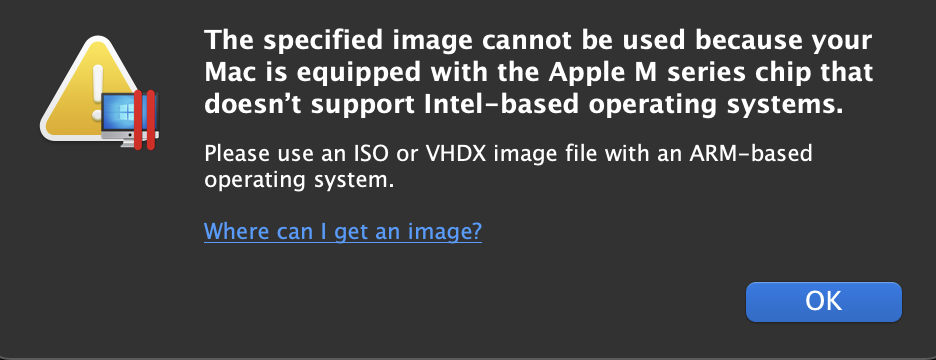
As an IT technician working primarily on a MacBook Air M2, I hit a wall: ARM architecture meant no native x86 Windows — limiting my diagnostic and virtualization work. Rather than spin up a cloud VM, I built a custom PC from scratch to gain real hands-on experience. Phase 1 covered the hardware build and Windows 11 installation. Phase 2 evolved it into a virtual enterprise network lab running pfSense, Windows 11, and Linux Mint VMs with policy-based firewall rules.
PHASE 1Hardware Build & OS Deployment ✓ Complete
The Problem
My MacBook Air M2 is a great daily driver — but its ARM-based architecture meant that installing Windows required ARM-specific ISO images, cutting me off from the full x86 Windows environment I needed for proper IT diagnostics. Cloud VMs like Azure were an option, but I wanted the real thing: hands-on hardware experience from scratch.
MacBook Air M2 — the primary machine that started it all
Hardware Specifications
Every component was chosen deliberately — balancing budget, performance headroom for virtualization, and the absence of a discrete GPU (which the Ryzen 5600G's integrated Radeon handles cleanly).
The 5600G was a strategic pick — strong multi-core performance for nested virtualization with no discrete GPU needed, keeping costs down. 32GB of RAM ensures real headroom when running multiple VMs simultaneously under VMware or VirtualBox.
Parts collection — all components laid out before assembly
BIOS Configuration
Two critical configurations were made during the initial BIOS setup:
A-XMP Profile enabled — unlocks the RAM's maximum supported frequency of 3200MHz. Without this, DDR4 defaults to JEDEC speeds (typically 2133MHz), leaving performance on the table.
TPM 2.0 activated — required for Windows 11's Secure Boot and system integrity features. The B550M is TPM 2.0 compliant out of the box once enabled in firmware.
BIOS configuration — A-XMP enabled, TPM 2.0 active
OS Installation
A clean installation of Windows 11 Home (version 24H2) was performed from a standard x86 ISO — exactly the environment that wasn't accessible on the M2. No bloatware, no upgrades-in-place. Fresh slate, optimized for diagnostics and future virtualization work.
Windows 11 Home (24H2) — clean installation complete
Phase 2 transformed OSmith from a workstation into a simulated enterprise network — firewall enforcement, selective device-level access control, DNS filtering, and cross-platform policy testing, all running in VMware Workstation.
Virtual Machine Setup
Three VMs were deployed on VMware Workstation using a Custom (VMnet11) host-only network, simulating a real internal LAN where all devices communicate through a managed gateway.
🛡️
pfSense 2.7.2
Virtual firewall & DHCP server
🪟
Windows 11 VM
Standard client workstation
🐧
Linux Mint VM
Admin / test machine
All VMs sit on VMnet11. pfSense manages IP allocation via 192.168.1.0/24 and handles all traffic routing between the virtual LAN and the WAN (NAT).
VMware Workstation — three VMs on VMnet11 custom network
pfSense Configuration
pfSense was accessed via its WebConfigurator at https://192.168.1.1 from a client VM. Key interface and service configuration:
WAN: Connected to NAT for external internet access
LAN: Connected to VMnet11 at 192.168.1.1/24
DHCP Server: Enabled for LAN — auto-assigns IPs to client VMs
DNS Resolver: Configured with host overrides for local hostname resolution
The first rule test was a global block: prevent all LAN clients from reaching chat.openai.com by adding a LAN firewall rule targeting the FQDN alias.
Result: both Windows 11 and Linux Mint received "Site can't be reached" and "Server not found" errors — DNS resolution was intercepted at the gateway before any HTTPS request was made.
Both VMs blocked from ChatGPT — firewall rule in effect
Conditional Access: Windows Blocked, Linux Allowed
The real test was demonstrating per-device policy enforcement — a core enterprise firewall concept. The goal: Linux Mint can reach ChatGPT, Windows 11 cannot.
Implementation
Created a Firewall AliasUbuntu_Allow pointing to Linux Mint's IP address
Created a Firewall AliasBlock_ChatGPTs targeting the FQDN chat.openai.com
Rule 1 (Allow):Ubuntu_Allow → Block_ChatGPTs — placed at top of rule list
Rule ordering is critical in pfSense — the first matching rule wins. The allow rule must sit above the block rule, otherwise the allow is never evaluated.
pfSense LAN firewall rules — allow rule above block rule
Result
❌ Windows 11 — DNS resolution fails, site unreachable
✅ Linux Mint — accesses and logs into ChatGPT normally
Side-by-side result — Windows blocked, Linux Mint access confirmed
Connectivity Verification
CLI tools were used throughout to verify routing behavior and rule effectiveness: ping, ip a, nslookup, dig, and traceroute — confirming that DNS was being resolved (or blocked) at the pfSense gateway, not the client OS.
Configured virtual LAN with DHCP, DNS, and firewall segmentation using pfSense
Enforced domain-based filtering (FQDN aliases) at gateway level
Demonstrated policy-based access per device using ordered firewall rules
Proved packet flow and DNS behavior using CLI tools and browser validation
Tech Stack & Skills Gained
// Virtualization
VMware Workstation Pro
Custom VMnet host-only networking
Linux Mint & Windows 11 VMs
Multi-OS cross-platform testing
// Firewall & Networking
pfSense 2.7.2 LAN/WAN config
DHCP server & DNS resolver
FQDN-based firewall aliases
Ordered rule enforcement
// Network Security
Policy-based access control
DNS blackhole filtering
Rule testing & verification
Client isolation via gateway
// Diagnostics
ping, ip a, traceroute
dig, nslookup
Browser-based DNS validation
Lab documentation & reporting
"This project demonstrated my ability to build, secure, and manage a cross-platform virtual network using pfSense, Linux, and Windows in a structured, test-driven lab environment. It reflects real-world enterprise firewall concepts and hands-on troubleshooting skills."
— Prasiddha Thapaliya, April 2025
// CONTACT
Let's Build Something Together
Open to Help Desk, IT Support Technician, and Systems Administration roles in Toronto. Response time under 24 hours.
"From fixing a neighbor's fan with a wooden broomstick as a child to troubleshooting complex IT systems today — I've always been a natural fixer. Let's connect."